Setup 4/4: Simulation stethoscope
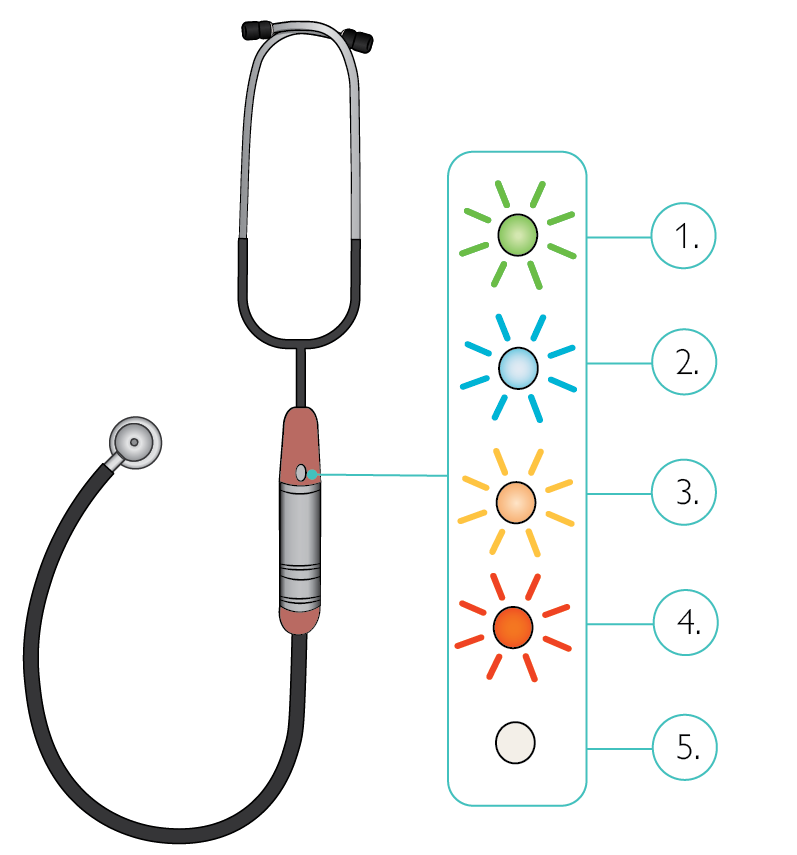
Flashing green: Connected to simulator
Flashing blue: Searching for simulator
Flashing yellow: Battery low, needs to be replaced or charged
Steady red: Turning off
LED off: Stethoscope is turned off
Paul‘s heart, lung and bowel sounds can be auscultated using the simulation stethoscope supplied.
To prevent technical background noise during auscultation of Paul, the sounds are generated by the physiology server depending on the auscultation location and automatically transmitted to the stethoscope through a Bluetooth connection.
Depending on the position of the stethoscope, the different sounds (heart, lungs, bowel) are mixed according to intensity and output.
To switch on the stethoscope, briefly press the switch-on button on the front of the stethoscope. The status indicator flashes blue then green.
On the user interface, the green tick above the stethoscope icon indicates that the stethoscope is connected.